


TL;DR:
- A return trip transfer booking workflow automates the entire process from passenger inquiry to dispatch, reducing errors and delays. It relies on early flight information, payment triggers, real-time flight tracking, and version control to ensure accuracy. Solidride offers a fully managed transfer service in Tallinn that incorporates these best practices for solo and group travelers.
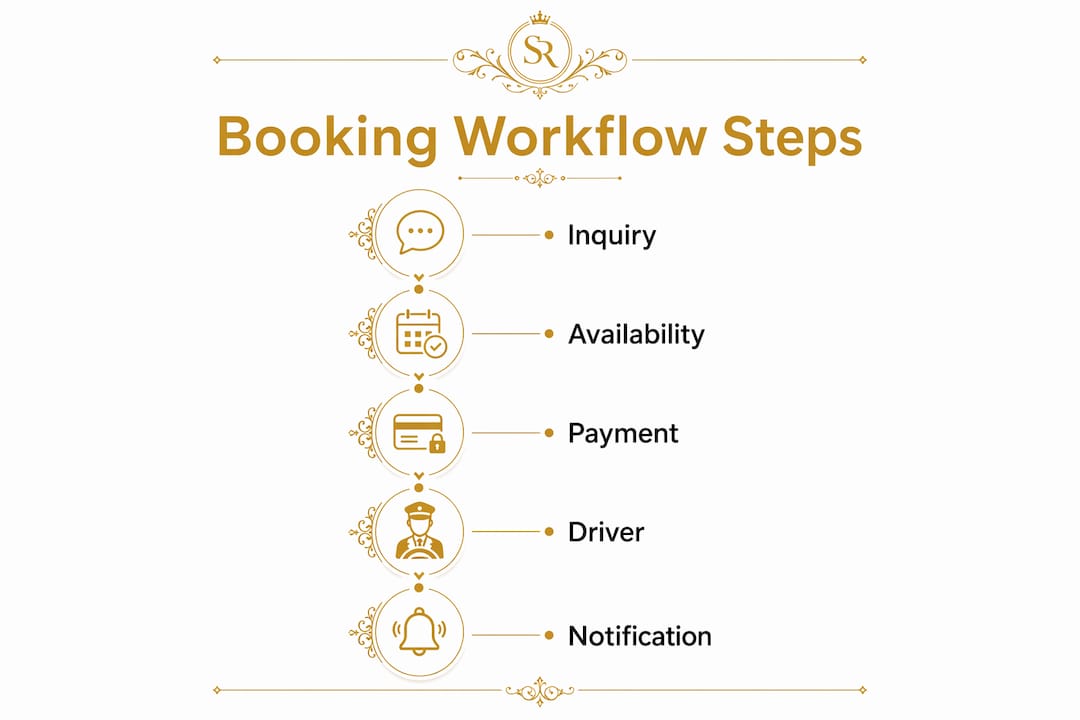
A return trip transfer booking workflow is the structured process of capturing, confirming, and dispatching both outbound and return legs of a private transfer in a single, automated sequence. Travelers and event organizers who book both legs together avoid the most common failure points: missed pickups, pricing mismatches, and last-minute scrambles. The workflow spans five distinct stages, from initial inquiry through real-time dispatch, and depends on accurate passenger data, flight numbers, and payment triggers to function correctly. Solidride builds this entire process into its private transfer service, giving travelers in Tallinn a fully managed booking experience from the first click to the final drop-off.
What are the core steps in a return trip transfer booking workflow?
A complete transfer booking process runs through five sequential stages, each one feeding the next. Skipping or rushing any stage creates errors that compound by departure day.

Stage 1: Initial inquiry and trip intake. The workflow starts when a traveler submits passenger count, luggage pieces, pickup and drop-off locations, and both outbound and return flight numbers. Providing flight numbers 14 days before travel is the industry standard for securing optimal transfer windows, especially on routes with limited availability or heavy traffic. Submitting this data early locks the schedule before capacity fills.
Stage 2: Automated availability and pricing check. Once the intake form is complete, the system runs an instant availability check and generates a quote. Automated pricing checks eliminate manual back-and-forth and reduce response time to near zero. The quote reflects vehicle capacity, zone-based pricing, and any special requirements like child seats or oversized luggage.
Stage 3: Payment processing. Payment, whether a deposit or full amount, is the trigger that locks inventory. Clear payment triggers like “deposit received” prevent double-booking and eliminate the need for re-quotes. Without a defined payment event, the booking remains soft and vulnerable to capacity loss.
Stage 4: Vendor confirmation and driver assignment. After payment clears, the system automatically assigns a driver and vehicle. Automated driver assignments typically occur 90 minutes before the scheduled pickup. This timing gives the driver enough lead time to prepare the route and account for traffic.
Stage 5: Customer notification and pre-trip reminders. The traveler receives a booking confirmation immediately after payment, followed by automated reminders as the trip approaches. These notifications include driver details, vehicle type, and pickup instructions.
Pro Tip: Lock your outbound and return flight numbers into the booking form at the same time. Submitting both together prevents the return leg from being treated as a separate, unlinked booking, which is where most scheduling errors originate.
How to handle group bookings and special requirements in the workflow?
Group transfer bookings require more upfront detail than solo bookings. The workflow must account for passenger count, age categories, luggage volume, and any accessibility needs before a quote can be generated accurately.
The most common error in group bookings is submitting a headcount without specifying adults, children, and luggage pieces separately. Vehicle capacity calculations depend on all three variables. A group of eight adults with large suitcases may require a different vehicle configuration than eight adults traveling with carry-on bags only. Submitting vague data forces a manual review, which delays confirmation and risks losing availability.
Key requirements for a clean group booking submission:
- Exact number of adults and children traveling
- Number and size of luggage pieces per passenger
- Any special equipment such as strollers, wheelchairs, or sports gear
- Preferred pickup and drop-off addresses for each leg
- Return flight number and estimated arrival time
Versioned itinerary drafts are the most effective tool for managing group booking revisions. A system that maintains a single accepted version while allowing revision loops prevents the confusion that comes from multiple edited copies circulating between organizers and operators. When a group member drops out or luggage requirements change, the revision is logged against one master record.
Last-minute changes in group bookings affect vehicle routing and capacity. Proactive communication of those changes to the transfer operator, ideally 24 hours before pickup, gives the dispatch team time to reassign vehicles without disrupting other bookings.
Pro Tip: Ask your transfer provider for a prepopulated booking link. These links carry your group’s standard details, such as passenger count and preferred vehicle, so each new booking takes seconds and eliminates data entry errors.
How does integrating real-time flight tracking improve return transfer bookings?
Real-time flight tracking is the single biggest upgrade to any return journey arrangement. Without it, a driver dispatches based on the scheduled arrival time. With it, the system monitors the actual flight and adjusts pickup timing automatically.
AI-driven dispatch with live flight monitoring eliminates the two most expensive problems in airport transfers: unnecessary waiting and missed pickups. A flight delayed by 45 minutes no longer means a driver waiting at arrivals for nearly an hour or a traveler landing to find no car. The system recalculates dispatch time the moment the delay is confirmed.
The practical benefits for travelers and event organizers include:
- Automatic pickup time adjustment when flights run early or late
- Real-time driver location updates sent to the traveler’s phone
- Elimination of no-show charges caused by flight schedule changes
- Reduced stress for travelers connecting from international flights with tight layovers
The return leg of a booking benefits most from this integration. Linking the return leg to the outbound flight number at the time of booking creates a live connection between the flight’s actual status and the driver’s dispatch schedule. The traveler does not need to call ahead or update the booking manually when a flight runs late.
For event organizers managing multiple arrivals, flight tracking also enables staggered dispatch. Rather than sending all vehicles at the same time, the system sequences pickups based on actual landing times, which reduces idle time and fuel costs across the fleet.
What tools and systems support an effective transfer booking workflow?
The technology behind an efficient booking workflow for transfers covers four functional layers: intake and pricing, payment and confirmation, dispatch and tracking, and revision management.
Separating the logic for airport pickups and drop-offs within the booking system allows each direction to carry its own availability controls and pricing rules. A drop-off to the airport at 4:00 AM carries different cost and availability parameters than an afternoon pickup. Systems that treat both directions identically produce inaccurate quotes and scheduling conflicts.
| Feature category | What it does | Why It Matters |
|---|---|---|
| Zone-based pricing engine | Calculates fares by pickup and drop-off zones | Prevents manual pricing errors on multi-stop routes |
| Versioned itinerary management | Tracks all booking revisions against one master record | Reduces confusion during group booking changes |
| Real-time flight API integration | Monitors live flight status and adjusts dispatch | Eliminates no-shows and unnecessary driver wait time |
| Automated payment triggers | Locks inventory on deposit or full payment receipt | Prevents double-booking and re-quote cycles |
| Partner and CRM portal access | Connects travel agents and hotel concierges to the booking system | Speeds up corporate and group booking submissions |
Integration with hotel property management systems and travel agency CRM platforms is the feature most often overlooked by smaller operators. When a hotel concierge can submit a transfer booking directly into the operator’s system, the entire confirmation loop shortens from hours to minutes. For event organizers coordinating dozens of arrivals, that speed difference is significant.
Pro Tip: When evaluating booking platforms, test the revision workflow before committing. Submit a group booking, then change the passenger count and check whether the system updates the vehicle assignment and price automatically. If it requires a manual call, the workflow will break under pressure.
Key Takeaways
A well-built return trip transfer booking workflow automates every stage from intake to dispatch, using flight data, payment triggers, and versioned itineraries to eliminate errors and delays.
| Point | Details |
|---|---|
| Submit flight numbers early | Provide both outbound and return flight numbers at least 14 days before travel to lock scheduling. |
| Payment triggers inventory | A defined payment event, such as deposit received, prevents double-booking and re-quote cycles. |
| Group bookings need full detail | Specify adults, children, and luggage pieces separately to get accurate vehicle and pricing assignments. |
| Flight tracking adjusts dispatch | Linking the return leg to a live flight number eliminates no-shows caused by delays or early arrivals. |
| Versioned itineraries reduce errors | A single accepted itinerary with a revision log keeps group bookings aligned across all parties. |
What I’ve learned from watching transfer bookings go wrong
The most preventable failures in return transfer management share one root cause: the workflow was designed for the easy case and broke on the first exception. A solo traveler with one bag and a confirmed flight is simple. A group of 14 with three checked bags each, two children, and a flight that lands 80 minutes late is where the system either holds or falls apart.
The payment trigger issue is more common than operators admit. I have seen bookings where the driver was assigned, the confirmation was sent, and the vehicle was dispatched, all before payment was actually collected. The booking looked complete in the system. The money was not there. When the traveler canceled, the operator had no recourse and the vehicle slot was gone. A single defined trigger, “deposit received equals booking confirmed,” would have prevented it entirely.
Group communication is the other consistent failure point. Organizers often update their own spreadsheet and assume the transfer operator has been notified. The operator dispatches based on the original booking. The group arrives with two extra passengers and a wheelchair that was not listed. The driver cannot accommodate them. Everyone is frustrated, and the fix requires a phone call that should never have been necessary. Proactive change communication, sent directly to the operator at least 24 hours before pickup, is the only reliable solution.
Automation does not replace communication. It handles the routine cases so that the human attention is free for the exceptions. The best booking workflows I have seen treat automation as the floor, not the ceiling. The system handles pricing, confirmation, and dispatch. The people handle the edge cases. That division of labor is what makes the whole thing work.
— Erki
Solidride’s transfer service for travelers and event organizers
Travelers and event organizers who need a reliable, fully managed transfer experience in Tallinn will find that Solidride covers every stage of the workflow described here.

Solidride operates 24/7 private chauffeur and airport transfer services across Tallinn, with real-time flight monitoring built into every booking. The service supports both solo and group transfers, with Mercedes-Benz V-Class vehicles accommodating larger parties and extra luggage. Bookings include automated confirmation, driver assignment, and pre-trip notifications. For event organizers managing multiple arrivals, Solidride’s group transfer support handles staggered pickups and last-minute changes without requiring manual coordination. Every return leg is linked to the outbound flight number at the time of booking, so dispatch adjusts automatically when flights run early or late.
FAQ
What is a return trip transfer booking workflow?
A return trip transfer booking workflow is the end-to-end process of capturing passenger details, generating a quote, processing payment, assigning a driver, and dispatching for both the outbound and return legs of a private transfer in one connected sequence.
How far in advance should I submit flight details for a return transfer?
Submit both outbound and return flight numbers at least 14 days before travel. Early submission locks the transfer window and prevents scheduling conflicts on high-demand routes.
How does real-time flight tracking affect my return transfer pickup?
The booking system monitors your flight’s live status and automatically adjusts the driver’s dispatch time if your flight is delayed or arrives early. This eliminates no-show charges and unnecessary waiting at arrivals.
What information does a group transfer booking require?
A group booking requires the exact number of adults and children, the number and size of luggage pieces, any special equipment, and both outbound and return flight numbers. Incomplete data delays confirmation and risks vehicle capacity errors.
What is the difference between a deposit trigger and a full payment trigger?
A deposit trigger locks inventory as soon as a partial payment is received, securing the booking without requiring full payment upfront. A full payment trigger holds the booking open until the total amount clears, which can result in capacity loss if payment is delayed.
Add a comment